Writing GitHub Actions
Section 05 · Lesson 4 · Level: beginner · ~20 min · Prereq: Branching and pull requests
Why this matters
CI/CD means continuous integration and continuous delivery: a machine that runs your checks on every change so a broken commit never reaches main by accident. GitHub Actions is the machine GitHub gives you, configured with a YAML file in your repo. Six words of vocabulary separate copying a workflow from being able to fix one.
Six words, then a workflow
- Workflow — one YAML file in
.github/workflows/that says "run these things when this happens". - Event — the trigger, written under
on:. - Job — a unit of work with a runner and steps. Jobs run in parallel unless you order them.
- Step — one command or action; steps run in order.
- Action — a published, reusable unit referenced with
uses:. - Runner — the machine that runs a job (
runs-on: ubuntu-latestis a fresh Linux VM).
Here is a complete workflow for a Python project. Read it twice.
name: PR checks

on:
  pull_request:
    branches: [main]

permissions:
  contents: read

jobs:
  test:
    runs-on: ubuntu-latest
    timeout-minutes: 15
    steps:
      - uses: actions/checkout@v4
      - uses: actions/setup-python@v5
        with:
          python-version: "3.12"
      - name: Install dependencies
        run: pip install -r requirements.txt
      - name: Lint and test
        run: |
          ruff check .
          pytest -q
name: is the label on the PR. on: limits it to pull requests into main. permissions: shrinks the automatic token to read-only, the recommended default. jobs.test is one job on a clean Ubuntu runner. actions/checkout@v4 copies your repo in — without it the runner has no files. actions/setup-python@v5 installs the runtime. The last step is a plain shell command, so a non-zero exit fails the job.
Here is that flow:
sequenceDiagram
    participant Dev as Developer
    participant GH as GitHub
    participant Run as Runner
    Dev->>GH: git push
    GH->>GH: match workflow to event
    GH->>Run: provision a job
    Run->>Run: checkout and run steps
    Run-->>GH: step result
    GH-->>Dev: status check
Triggers, and what each costs
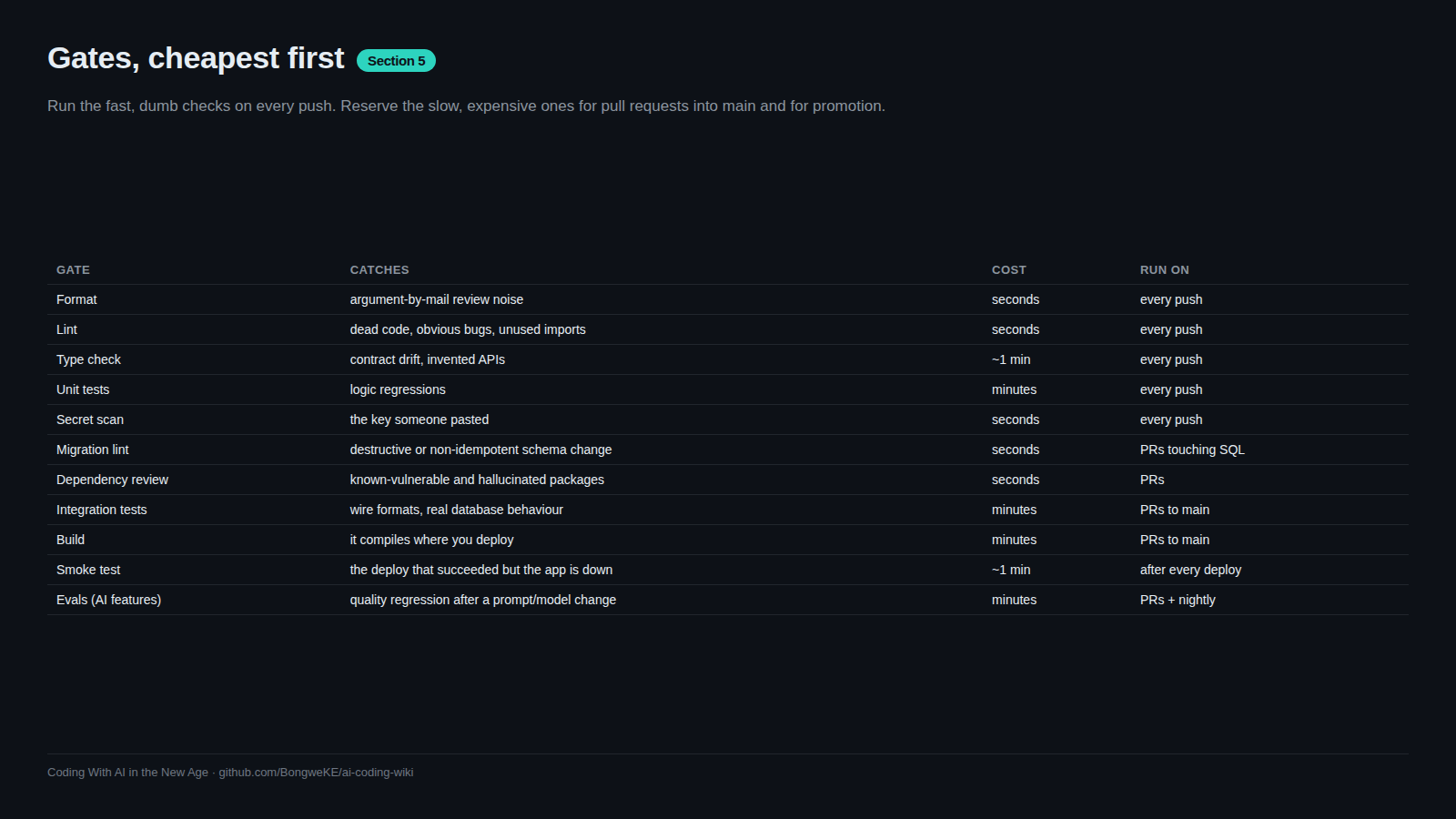
pull_request— runs on every update to a PR. This is where your gates belong.push— runs on every push to the branches you list. Use it formainonly, not for every branch, or you run everything twice.workflow_dispatch— adds a "Run workflow" button. Use it for deploys and promotions that a human should start.schedule— a cron timer. It burns runner minutes even when nothing changed, so reserve it for nightly jobs.
On a private repository, every runner minute is billed; public repositories are usually free on standard runners (check GitHub's current billing docs — this changes). Keep PR checks short and move slow suites to a nightly schedule.
Runners, limits, and cancellation
A GitHub-hosted runner is a clean machine that exists for one job, then disappears. Nothing you write to it survives, which is why dependencies are re-installed every run and caching exists. Set timeout-minutes: at the job level so a hung test fails in fifteen minutes instead of holding a runner for hours.
Two pushes to a branch make the older run worthless. A concurrency group cancels it:
concurrency:
  group: pr-${{ github.ref }}
  cancel-in-progress: true
github.ref is the branch ref, so each PR gets its own group, and a new push cancels the previous run. Never use this on a deploy job — you do not want a deploy cancelled halfway.
Moving data between steps and jobs
Three mechanisms, three purposes:
env— environment variables available to a step or a job. Good for configuration values.$GITHUB_OUTPUT— how a step publishes a small result that a later step can read.- Artifacts — files (a coverage report, a build output) uploaded from one job and downloaded in another.
An output looks like this:
      - name: Detect changed area
        id: scope
        run: |
          if git diff --name-only HEAD~1 | grep -q '^src/'; then
            echo "run_integration=true" >> "$GITHUB_OUTPUT"
          else
            echo "run_integration=false" >> "$GITHUB_OUTPUT"
          fi
      - name: Integration tests
        if: steps.scope.outputs.run_integration == 'true'
        run: pytest -q tests/integration
The step needs an id so later steps can reference steps.scope.outputs.<name>. Write to $GITHUB_OUTPUT with an append; it replaced the removed set-output command. Order jobs with needs::
  integration:
    needs: test
    runs-on: ubuntu-latest
needs: test means the integration job waits for test and is skipped if it fails. That is how a pipeline gets a shape instead of a pile.
Local sanity before you push
Validate the YAML first — a bad indent means GitHub ignores the workflow. Then run the same commands locally:
python -c "import yaml; yaml.safe_load(open('.github/workflows/pr.yml'))"
ruff check . && pytest -q
If the commands pass locally and the job fails, the cause is almost always environmental: a different runtime, a missing system package, or an unset variable.
Try it
- Create
.github/workflows/pr.ymlwith the workflow above, adjusted to your project. - Validate it:
python -c "import yaml; yaml.safe_load(open('.github/workflows/pr.yml'))". - Run the same lint and test commands in your terminal and fix anything they catch.
- Commit, push a branch, and open a PR. Watch the run appear under the Checks tab.
- Add
concurrencywithcancel-in-progress: trueand push twice quickly. Confirm the first run is cancelled. - Break one test on purpose and confirm the job fails.
Common mistakes
- Forgetting
actions/checkout. Everyrun:step then executes in an empty directory and fails with "file not found". The checkout step must come first. - Using a
uses:action that does not exist, or a tag that was never published. An invented action name or a guessed version fails at job start. Stick to well-known actions and their real major tags. - Interpolating untrusted input into a shell command. A PR title containing
"; rm -rf ...can inject into your script. Pass untrusted values through anenv:variable and quote it. - Running the same suite on
pushandpull_request. You pay for it twice and reviewers wait longer. Trigger checks on PRs, and on pushes only tomain.
Key takeaways
- A workflow is a YAML file;
on:decides when, jobs are runners plus steps, anduses:pulls in actions. - Run gates on
pull_request; reservescheduleandworkflow_dispatchfor jobs that should not run on every change. - GitHub-hosted runners are ephemeral, so install and cache deliberately, and set
timeout-minutes. - Pass data with
env, step outputs via$GITHUB_OUTPUT, files via artifacts, and order jobs withneeds:. - Validate the YAML and run the commands locally before you push.
Further learning
- Workflow syntax for GitHub Actions — the full reference for every key used above.
- Workflows — concepts behind the YAML.
- Workflow commands for GitHub Actions —
$GITHUB_OUTPUT, masking, and annotations. - Secure use reference — token permissions, injection, and pinning actions.